
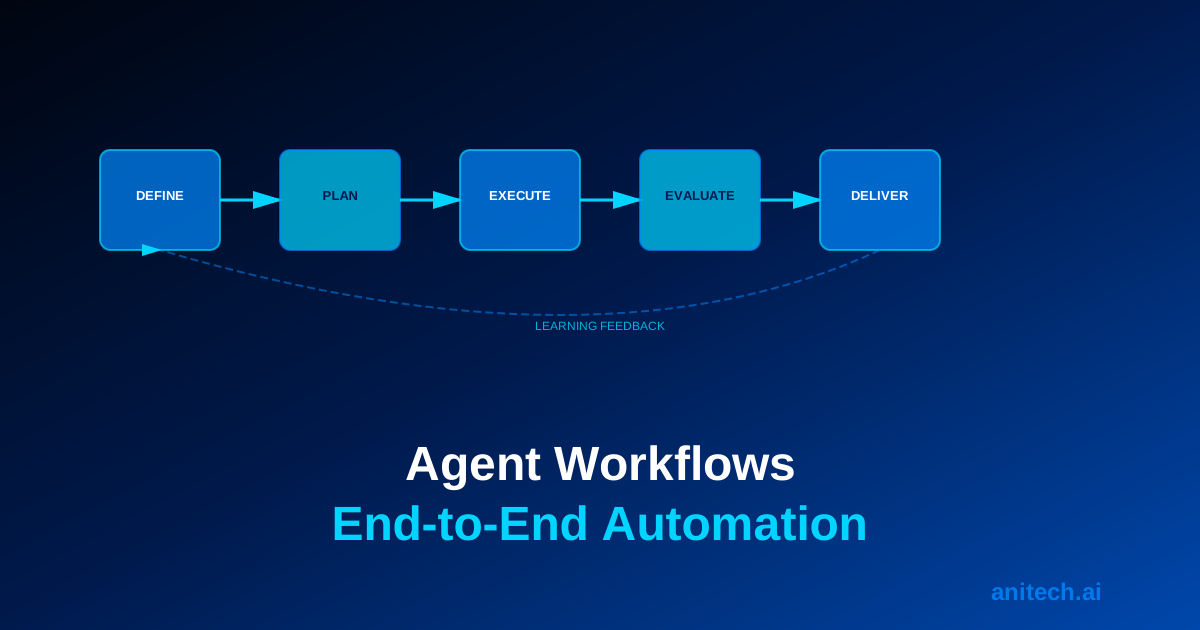
Workflow vs. Process: What’s the Difference?
A process is how work currently gets done—the steps, the people involved, the tools used, the wait times.
A workflow is how work should get done after optimisation—the ideal sequence of steps, tools, and decisions that minimises time, cost, and errors.
An AI agent workflow is an automated workflow where agents handle decision-making and execution, reducing human involvement to high-value activities.
Most businesses have multiple overlapping processes. Each is partially manual, partially automated, full of wait times, handoffs, and exceptions. An AI agent workflow reimagines these processes for the era of intelligent automation.
The Anatomy of an Effective Agent Workflow
Input Trigger
Every workflow starts with a trigger. Something initiates the process:
– A customer submits a support ticket
– A sales team member marks a lead as qualified
– A financial document arrives in the inbox
– A scheduled time arrives (daily report generation)
– An external event occurs (data update, competitor announcement)
The trigger must be reliable and unambiguous. The agent needs to know when to start and what initiated the workflow.
Initial Context Gathering
Once triggered, the agent gathers context. What information does it need?
For a support ticket: customer history, account status, product used, error messages, previous tickets.
For a lead: company information, decision-making timeline, competitor usage, industry trends.
For a financial document: vendor history, budget allocation, policy requirements, approval chain.
The agent queries data systems, retrieves relevant information, and establishes a complete picture before proceeding.
Goal Definition
The agent clarifies its objective. Not vaguely (“handle this ticket”) but specifically (“resolve this technical issue and achieve 95%+ customer satisfaction”).
Clear goals guide decision-making. When the agent encounters options, it chooses the path most likely to achieve the goal.
Decision Logic
Based on context and goal, the agent makes decisions:
- Classify the issue
- Determine if it’s within scope
- Identify the best approach
- Assess complexity
- Decide internal resolution vs. escalation
This decision logic should be explicit. You should understand why the agent chose this path.
Action Execution
The agent executes its decisions: calls APIs, queries databases, generates content, sends communications.
Execution should be logged. Every action is recorded with timestamp, parameters, and result.
Outcome Evaluation
After action execution, the agent evaluates: Did this work? Should I continue? Should I try a different approach?
If the action succeeded, the agent proceeds to the next step. If it failed, the agent either retries (with modifications) or escalates.
Result Delivery
The agent delivers results: updated customer record, resolved ticket, completed report, scheduled action.
Depending on the workflow, results go to:
– End users (customers, employees)
– Other systems (CRM updates, accounting systems)
– Other agents (handoff for next step)
– Humans (escalation for judgment)
Learning and Feedback
The workflow logs what happened and why. This becomes data for continuous improvement.
What decisions worked? What failed? Why? This feedback improves future workflow executions.
Common Workflow Patterns
Pattern 1: Linear Workflow (Sequential Steps)
Steps happen in strict order. Each step completes before the next begins.
Example: Document Processing
1. Receive document → 2. Extract data → 3. Validate data → 4. Check compliance → 5. Route for approval → 6. Process request
Suitable for: Structured processes with clear sequences and dependencies.
Pattern 2: Conditional Workflow (Decision Tree)
The path through the workflow depends on decisions made along the way.
Example: Support Ticket Routing
1. Receive ticket
2. Classify issue → If technical, route to technical agent. If billing, route to billing agent.
3. Agent handles issue
4. If resolved, close. If complex, escalate to human
5. Deliver result
Suitable for: Processes with multiple potential paths based on context.
Pattern 3: Parallel Workflow
Multiple agents work on different aspects simultaneously.
Example: Contract Analysis
1. Receive contract
2. Parallel agents: Legal compliance agent, Financial terms agent, Technical feasibility agent, Risk assessment agent
3. All agents work simultaneously
4. Consolidation agent combines analyses
5. Deliver comprehensive review
Suitable for: Complex problems requiring multiple expert perspectives.
Pattern 4: Iterative Workflow (Loop and Refine)
The agent repeatedly executes a process, refining it each iteration, until goals are achieved.
Example: Lead Nurture Campaign
1. Identify unengaged lead
2. Send outreach message
3. Monitor engagement for 5 days
4. If engaged, route to sales. If not engaged, proceed to step 5.
5. Modify approach based on initial failure
6. Send alternative outreach
7. Monitor and iterate until engagement or max iterations reached
Suitable for: Processes requiring experimentation and refinement.
Pattern 5: Hierarchical Workflow
High-level decisions drive lower-level execution.
Example: Strategic Customer Retention
1. Analyse churn drivers
2. If response time is issue → Launch support improvement project
3. If product gaps are issue → Launch product feedback initiative
4. If pricing is issue → Launch pricing review
5. Each project unfolds as a sub-workflow
6. Monitor impact
Suitable for: Complex strategic initiatives with multiple execution tracks.
Designing Your First Agent Workflow
Step 1: Select Your Process
Choose a process that is:
– High impact (saves significant time or cost, improves quality)
– Repetitive (happens regularly, not one-time)
– Structured (mostly rule-based, limited variability)
– Bounded (clear start, clear end, well-defined scope)
– Lower risk (errors are manageable, not catastrophic)
Good candidates:
– Invoice processing
– Lead scoring and routing
– Support ticket triage
– Report generation
– Appointment scheduling
– Data entry and validation
Poor candidates:
– Hiring decisions (high stakes, low repetition)
– Strategic planning (ill-defined, unstructured)
– Novel problem-solving (every case is different)
– Complex negotiations (require judgment)
Step 2: Map the Current Process
Document exactly what happens today:
- Trigger: How does the process start?
- Data gathering: What information is needed?
- Decision points: What choices are made? Based on what criteria?
- Actions: What gets done?
- Handoffs: Where does work go to other people/systems?
- Outcomes: What’s the result?
- Exceptions: What goes wrong? How is it handled?
- Time and cost: How long does each step take? What does it cost?
Step 3: Identify Automation Opportunities
Where in the current process can agents add value?
- Data gathering: Can agents retrieve data automatically from systems?
- Decision-making: Can agents make decisions against clear criteria?
- Execution: Can agents perform actions (send emails, update records)?
- Monitoring: Can agents track outcomes and surface exceptions?
Mark steps as: Fully Automatable, Partially Automatable, Requires Human, or Escalation Point.
Step 4: Design the Agent Workflow
Create the ideal workflow where agents handle automatable work:
INPUT TRIGGER
    ↓
CONTEXT GATHERING (Agent)
    ↓
DECISION MAKING (Agent)
    ↓
ACTION EXECUTION (Agent)
    ↓
OUTCOME EVALUATION (Agent)
    ↓
OUTPUT DELIVERY
For complex workflows, add branching and decision points:
TRIGGER → CLASSIFICATION (Agent)
    → IF Type A: Route to Agent A (handles 70% of cases)
    → IF Type B: Route to Agent B (handles 20% of cases)
    → IF Type C: Escalate to Human (handles 10% of edge cases)
Step 5: Define Success Criteria
How will you measure if this workflow is working?
- Efficiency: How much faster? How much cost reduction?
- Quality: How much more accurate? How much better customer satisfaction?
- Reliability: How consistently does it work? What’s the error rate?
- Scale: How much volume can it handle?
Specific, measurable targets guide development and prove value.
Step 6: Build and Test
Implement the workflow with sample data. Test thoroughly:
- Does the agent gather correct context?
- Are decisions made accurately?
- Are actions executed properly?
- Are outcomes delivered correctly?
- What breaks? What exceptions occur?
Refine until the workflow works reliably.
Real-World Example: Customer Onboarding Workflow
Current Process (Manual): 5 days, 3 people, 60% error rate on first setup
Workflow Trigger: New customer signs contract
Step 1: Account Creation (Agent)
– Create account in system
– Set up billing information
– Configure initial access
Step 2: Environment Setup (Agent)
– Provision data structures
– Configure integrations
– Set permissions
Step 3: Customisation Assessment (Agent)
– Analyse customer industry, company size, use case
– Determine if standard setup or custom configuration needed
– Route to humans if custom configuration required (20% of cases)
Step 4: Documentation and Training (Agent)
– Generate onboarding guide tailored to customer context
– Create video tutorials for key workflows
– Schedule training call with customer
Step 5: Monitoring and Support (Agent)
– Monitor customer activity
– Identify if they’re struggling with any features
– Offer just-in-time support
Outcome: 95% of customers onboarded in 2 hours, fully self-service. 5% requiring human support. Customer satisfaction: 4.8/5.
Governance in Agent Workflows
Define Approval Requirements
For each workflow, clarify: what requires approval? Who approves?
- Fully autonomous workflows: no approvals needed (lead scoring, report generation)
- Human-in-the-loop workflows: approval at decision points (invoice processing, escalations)
- Human-led workflows: human decides; agent supports (strategic decisions)
Implement Escalation Protocols
When should the agent escalate to humans?
Define clear escalation rules:
– If customer is high-value, escalate to VIP support team
– If issue is outside agent’s scope, escalate to specialist
– If customer is angry, escalate to customer success manager
– If financial risk exceeds threshold, escalate to finance director
Maintain Audit Trails
Every agent decision and action is logged. You can trace:
– What happened
– When it happened
– Why the agent decided as it did
– What the outcome was
This audit trail is essential for accountability, compliance, and continuous improvement.
Optimising Agent Workflows Over Time
Monitor Performance Continuously
Track key metrics:
– How many workflows complete successfully?
– How many are escalated? Why?
– What’s the distribution of outcomes?
– Are any patterns emerging?
Identify Improvement Opportunities
Review escalated cases: Could the agent have handled them? What training would help?
Review successful cases: Are there better approaches? Could we speed it up further?
Review performance metrics: Where are the bottlenecks? What takes longest?
Refine Iteratively
Based on learnings, refine:
– Agent decision criteria (Is the agent using the right thresholds?)
– Workflow logic (Is the sequence optimal?)
– Escalation rules (Are we escalating too much? Too little?)
– Tool access (Does the agent have data it needs? Is it missing critical tools?)
Expand Gradually
Once a workflow is optimised, expand:
– Deploy to higher volume
– Extend to similar processes
– Move to higher-risk decisions (human-in-the-loop)
– Experiment with new optimisations
Common Pitfalls and How to Avoid Them
Pitfall: Automating the wrong process
Solution: Start with high-impact, structured, repetitive processes. Avoid high-stakes, novel, unstructured processes initially.
Pitfall: Workflow is too rigid
Solution: Build in decision points and branching. Allow agents to adapt to variations. Use iterative refinement rather than fixed sequences.
Pitfall: Agent lacks necessary data
Solution: Map data needs early. Ensure agent has access to all systems it needs. Build integrations before agent deployment.
Pitfall: Escalation overwhelming humans
Solution: Define clear escalation criteria. Train humans on how to work with agent escalations. Continuously refine escalation rules based on human feedback.
Pitfall: No way to improve over time
Solution: Build learning into workflows. Log every action and decision. Analyse patterns regularly. Refine systematically.
The Future: Adaptive Workflows
Today’s agent workflows follow predetermined paths. Tomorrow’s will adapt dynamically to context, learning continuously to improve outcomes.
Agents will experiment with different approaches, measure results, and automatically adopt what works. Workflows will self-optimise.
You’re building the foundation for that future now.
Next Steps
If your business has repetitive, structured processes that could be automated:
- Audit your processes: Which create most value? Which take most time? Which have highest error rates?
- Select your first workflow: Choose something high-impact but manageable.
- Map the current state: Document exactly what happens today.
- Design the ideal workflow: What should happen? Where can agents help?
- Build and test: Implement and refine iteratively.
- Measure and optimise: Track performance and improve continuously.
Ready to design AI agent workflows for your business?
Talk to Anitech AI. We’ve designed and deployed agent workflows across Australian enterprises. We understand workflow design, implementation challenges, governance, and continuous optimisation. We build workflows that work, scale, and improve over time.
Contact us to discuss agent workflows for your business.
Related Articles
- AI Agents for Business Australia: The Complete Guide to Agentic Automation
- Multi-Agent AI Systems: Orchestrating Teams of AI for Complex Business Workflows
- Autonomous AI Agents: How Businesses Are Delegating Complex Tasks to AI
- AI Agents for Operations: Autonomous Process Management Across Your Business
Further Reading
- AI Automation Australia — Complete Guide
- AI Agents for Business Australia: The Complete Guide to Agentic Automation — Industry Guide
- Autonomous AI Agents: How Businesses Are Delegating Complex Tasks to AI
- Multi-Agent AI Systems: Orchestrating Teams of AI for Complex Business Workflows
- AI Agents for Sales and Marketing: Autonomous Lead Generation and Nurturing
- AI Agents for Operations: Autonomous Process Management Across Your Business